
From the camera to the gallery and back, step by step.
Follow one unit through a live job: what you plug in, what you see in the browser, and what you can set at every step.
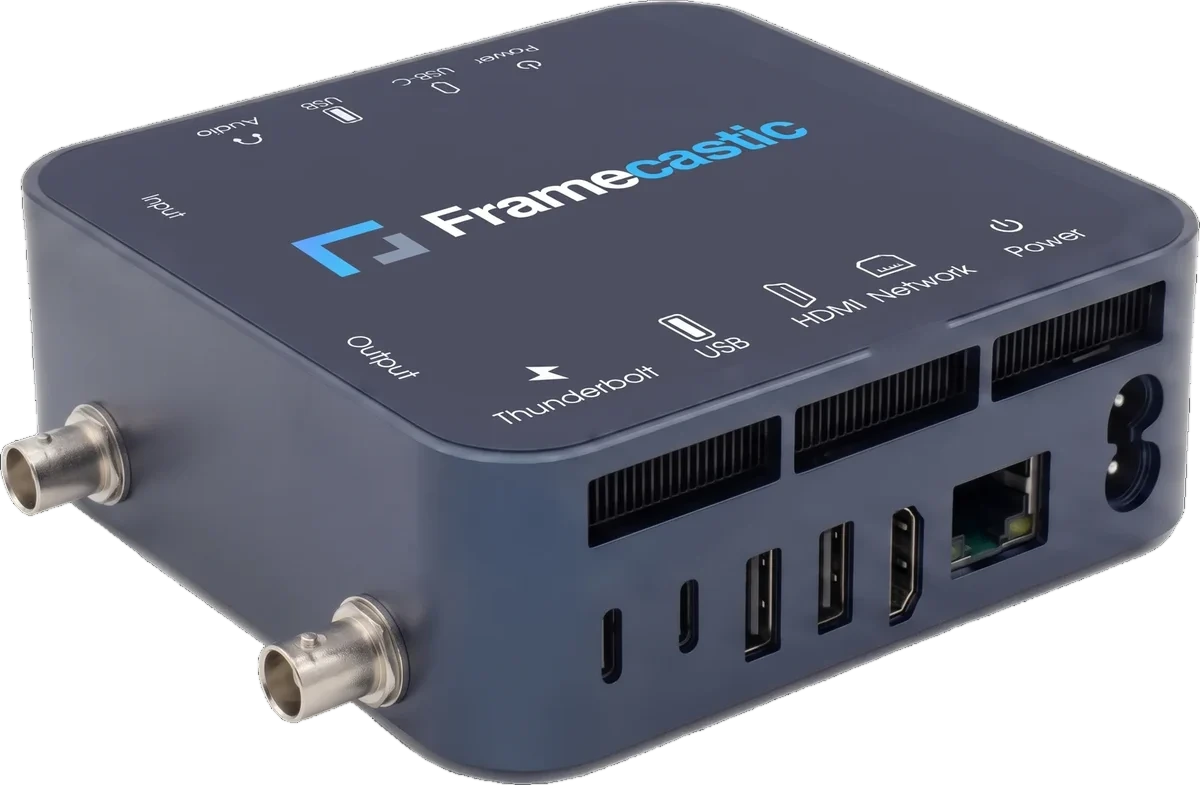
Two jobs in one small box.
The Portable Codec sends a camera out over IP and plays a stream back as SDI, both at the same time. It goes in a flight case or a bag and sits next to the camera.
- One encoder (SDI to IP) and one decoder (IP to SDI) running together
- H.264 and HEVC, encode and decode, in hardware
- HEVC 4:2:2 10-bit in both directions
- As a finished unit, or as a software licence on your own Intel hardware
Everything is in a browser.
There is nothing to install. Open the unit's address on a laptop or a phone, sign in, and every setting is a click away. The same settings are in the REST API.
- HTTPS, a login with a hashed password, lockout after repeated failures
- Your company's name instead of ours, if you sell it on
- A built-in manual on every screen
- Full REST API for automation
- Access
- HTTPSLogin with lockout
- Control
- Web interfaceREST API
- Brand
- Ours, or your company's
- Help
- Built-in manual
Both directions on one screen.
After signing in, the main screen shows the whole job: the encoder sending the camera out, the decoder bringing the programme back and the talkback line, each with its state. Above them, the health of the unit itself.
- A clear state on every card, and a count of what runs
- CPU, GPU, memory, network, temperatures and running time in one bar
- Start, stop, restart, preview, log and settings on every card
- Talkback on the same screen, with its volume and level
- Encoder
- SDI inIP out
- Decoder
- IP inSDI out
- Talkback
- SIP lineHeadset
- Every card
- StartStopRestartPreviewLogSettings
- Health
- CPUGPUMemoryTemperaturesNetwork
Choose how the camera is encoded.
Open the encoder's settings and choose the picture quality and the audio. The unit reads the camera's signal, so the settings match the source.
- H.264, or HEVC 4:2:0 and 4:2:2, 8 and 10-bit
- Constant bitrate up to 50 Mb/s
- Up to 16 audio channels, mapped to tracks as you choose
- A low-latency mode, or normal quality when every bit counts
- Codec
- H.264HEVC
- Chroma
- 4:2:04:2:2
- Bit depth
- 8-bit10-bit
- Bitrate
- Constant, up to 50 Mb/s
- Mode
- Low latencyNormal quality
- Audio
- Up to 16 channelsAACMPEG-1 Layer IIOpusPCM
The programme comes back on the same box.
The decoder takes the gallery's programme and plays it out on the SDI output, so the presenter and the camera operator see what is on air.
- Takes SRT, RIST, UDP, RTP, RTMP, RTSP, HLS or HTTP
- H.264 and HEVC, up to 4:2:2 10-bit, decoded in hardware
- Low-latency input profile, about 150 ms of buffering, or normal quality
- A file in a loop or a test pattern when there is no feed
- Input
- SRTRISTUDPRTPRTMPRTSPHLSHTTP
- Decode
- H.264HEVC up to 4:2:2 10-bit
- Buffering
- Low latency, about 150 msNormal quality
- No feed
- File in a loopTest pattern
Over any internet line, with lost packets sent again.
SRT carries the camera to the gallery and the programme back, and resends what the line drops. Either side can call or listen, whichever suits the firewall at the venue.
- SRT or RIST over the internet, UDP or RTP on your own network
- Caller or listener, independent of the picture's direction
- AES encryption up to 256-bit
- Several destinations at once, and two network paths with ST 2022-7
- Transport
- SRTRISTUDPRTP
- Role
- CallerListener
- Encryption
- AES-128AES-256
- Delivery
- Several destinationsST 2022-7, two paths
The director in the crew's ear.
The unit joins the production's talkback line and answers by itself. The director speaks in the gallery, and the crew hears it on the headset plugged into the box.
- Talkback over SIP, on the same internet line
- It answers calls by itself, and you choose the talkback room
- Played on the box's audio jack, into a headset
- Line
- SIP
- Answer
- Automatic
- Room
- Chosen per unit
- Output
- Audio jackHeadset
See what the unit is doing.
The metrics bar shows the unit's health at a glance, and every channel has a live picture. For SRT and RIST, graphs of round-trip time and recovered packets are kept for a week in detail and a month in summary.
- Live picture of the encoder and the decoder
- CPU, GPU, temperatures and network in one bar
- Link graphs for every SRT and RIST stream
- Alerts on the dashboard when a stream stops
- Picture
- Live preview of every channel
- Health
- CPUGPUMemoryTemperaturesNetwork
- Links
- SRT and RIST graphs7 days in detail30 days in summary
- Alerts
- A stream stops
Help reaches the box, wherever it is.
A switch lets our support team reach the unit over its own encrypted tunnel, even behind a venue's firewall. Switch it off and the door is closed again.
- Remote support over WireGuard, on and off from the browser
- The unit dials out, so the venue's firewall needs no changes
- Many units managed together from one central dashboard
- Tunnel
- WireGuard, encrypted
- Control
- On and off from the browser
- Firewall
- The unit dials outNo changes needed
- Many units
- One central dashboard
Click through it yourself.
Remote access to a running unit first, so you can try every setting on this page yourself. Then a unit on your own signal, with a written report you keep either way.