Up to eight channels per box
Two independent outputs up to 4K, each full screen or four at once, each quarter with its own channel.

Every match at once in a sports bar, or a small multiviewer wall in a control room, from one set-top box that drives two screens with up to four channels each.
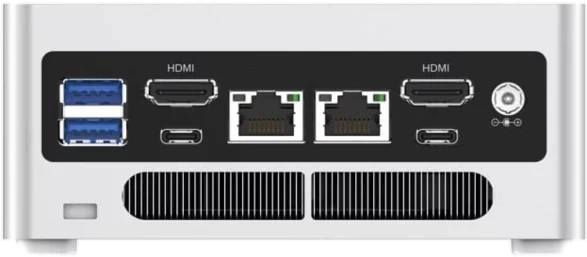
On a big match day every screen should show something different, and a control room wants to see several channels at once. A receiver per screen, or a separate multiviewer for every wall, adds up quickly.
Receivers and media players go into our encoders, and the IPTV Server keeps the channel list with names and logos.
Each screen shows one channel full screen or four at once, so one box shows up to eight channels.
Staff pick a channel per screen or per quarter with the remote and an on-screen menu, with no computer at the bar.
Two independent outputs up to 4K, each full screen or four at once, each quarter with its own channel.
The box comes up showing its channels after a power cut, with no one logging in, and keeps its settings.
The same box works as a sports wall on match day or as a small multiviewer in a control room.
A new channel starts in under two seconds, so switching to the match that just got interesting is immediate.
The box is 115 × 32 × 115 mm, so it fits behind a screen or on a shelf.
Every box reads the same channel list from the IPTV Server, so a channel added there is on every screen in the venue.
| Where | Unit | What it does |
|---|---|---|
| The centre | IPTV Server | One channel list, 100+ channels |
| Behind the screens | IPTV Set-Top Box | Two screens, up to eight channels |
| Your channels in | HDMI Encoder | Receivers and players, eight inputs per unit |
Yes. Each of its two screens shows one channel full screen or four at once, so one box shows up to eight channels.
No. They use the infrared remote and an on-screen menu, per screen or per quarter.
The box starts by itself and shows the same channels again, with no one logging in.
Yes. The same box drives a small wall of up to eight channels on two screens.
Software licences are perpetual: you buy once and own them. An optional annual SLA covers support and updates. Prices are on request.
TV channels on every screen in a hotel, office, stadium or hospital, from one central system.
The match on every screen in the ground: concourses, boxes, press and bars.
Your own channel line-up in every room, the lobby and the bar.
Remote access to a running box first, then a box on your own screens, with a written report you keep either way.
What we've built, once a month, two minutes to read. From the two of us, no tracking, leave any time.